Prometheux Snowflake Native App

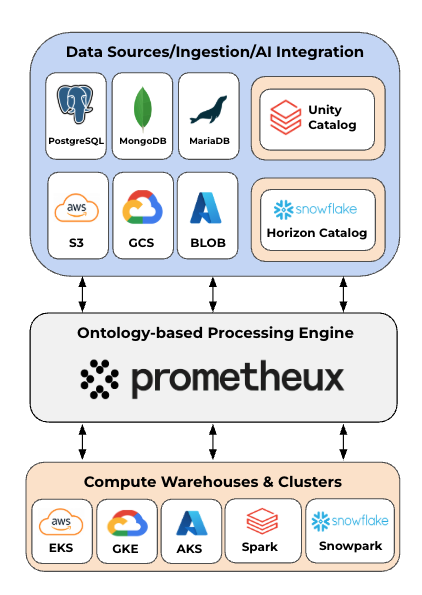
Prometheux is available as a Snowflake Native App that runs entirely within your Snowflake environment. This deployment model provides seamless integration with Snowflake's ecosystem while maintaining complete data sovereignty and security.


Overview

The Snowflake Native App enables you to:

  • Create unified virtual knowledge graphs connecting fragmented data sources
  • Perform advanced reasoning without data migration
  • Leverage Snowflake's compute for high-performance data processing
  • Maintain data sovereignty - all processing happens within your Snowflake account

Key Advantages

  • Data Sovereignty - data in procesed withing Snowflake
  • Snowflake-native security - leverages Snowflake's access controls
  • Elastic compute - scales with Snowflake warehouses and compute pools
  • Marketplace distribution - easy installation and updates

🗃️ Prometheux Snowflake Native App

Prometheux lets you create unified virtual knowledge graphs connecting your fragmented data (e.g., Snowflake, Databricks, PostgreSQL, MongoDB, Neo4j, CSV, Parquet) for querying and reasoning — as if they were in the same place and format, without data migration. Define, connect, and reuse simple business concepts on top of your enterprise data to power faster, fully explainable applications.


🚀 Key Capabilities

  • ⚡️ Seamless integration with ANY database and data type simultaneously
  • 🔒 No data migration required - data can stay in original sources
  • 🚀 Highly optimized data processing that outperforms traditional query engines and pyspark
  • 🎯 Advanced graph traversal and analytics without requiring a graph DB
  • 🤖 Integration with LLMs for enhanced interactions
  • 📊 Exact step-by-step provenance and lineage for all results

🔍 Use Cases

  • 🔄 Migrate data to Snowflake
    • simply import your fragmented data from multiple sources and formats
  • 📊 Graph Analytics without Graph DB
    • perform complex graph operations and reasoning over all your relational and NoSQL data without requiring a graph DB
  • 🏢 Company Ownership Analysis
    • analyze complex ownership network to uncover hidden controllers, trace global shareholding patterns, and support compliance activities including AML/UBO forensics, due diligence, credit assessment, and anti-takeover monitoring
  • 📋 Risk Management & Compliance
    • unified risk analysis and traceability for banking compliance reports
  • 🧬 Drug Discovery
    • connect chemical, biological, and experimental data sources to streamline scientists' research workflows
  • 🔍 Data Lineage & Root Cause Analysis
    • trace data flows and analyze causal relationships to identify impacts and sources of issues across interconnected systems
  • ⛓️ Supplier/Component Intelligence
    • assess critical dependencies and resilience in supply chains

🛠 Requirements

  • Snowflake Account: Any tier (Standard, Enterprise, Business Critical)
  • Privileges: ACCOUNTADMIN role for initial setup, or specific grants for non-admin users
  • Compute Resources: Access to create or use compute pools
  • Warehouse: Any warehouse for database operations

🔑 Automatic Privilege Granting

The Snowflake Native Apps framework automatically handles privilege granting for:

  • Application database and schema access
  • Service management and lifecycle operations
  • Snapshot creation and restoration
  • Configuration storage and retrieval

This eliminates the need for manual privilege grants that traditional applications require.


📦 Installation

Install directly from the Snowflake Marketplace or deploy using the provided setup scripts.


🚀 Quick Start

FULLY AUTOMATED SETUP

The platform uses database-driven configuration management. All settings are stored automatically and applied during startup.

  1. Navigate to Snowsight: Go to your Snowflake web interface
  2. Find the App: Navigate to Data > Apps > Prometheux
  3. Launch: Click the "Launch App" button
  4. Initialize: The app will auto-configure and provide a launch URL

That's it! The platform will automatically:

  • Create required databases and schemas
  • Set up default configuration
  • Start with optimal settings
  • Provide platform access URL

🎛️ Configuration Management

All configuration is stored in the database and applied automatically:

-- Set up database and schema context
USE DATABASE prometheux;
USE SCHEMA v1;

-- View current configuration
CALL get_app_configuration();

🏭 Warehouse Configuration

Prometheux automatically creates a dedicated warehouse called PROMETHEUX_WAREHOUSE to perform read/write operations on your Snowflake databases you will give access to. This warehouse is configured with:

  • Size: SMALL (optimal for most workloads)
  • Auto-suspend: 180 seconds (3 minutes)
  • Auto-resume: Enabled
  • Cost: Approximately $0.0023/hour when active

💰 Cost Optimization: Prometheux minimizes warehouse usage costs by storing application data in an internal PostgreSQL database within the compute pool, only using the Snowflake warehouse for operations on your Snowflake databases.

Customizing Warehouse Settings

-- Or use your existing warehouse alongside the app warehouse
GRANT USAGE ON WAREHOUSE YOUR_EXISTING_WH TO APPLICATION prometheux;

Using Custom Warehouses in Database Operations

When performing operations on your Snowflake databases, you can specify a custom warehouse using the warehouse parameter:

-- Example: Query data using a specific warehouse
-- (This option will be available when configuring database connections)
-- warehouse='YOUR_CUSTOM_WAREHOUSE'

💡 Tip: The default PROMETHEUX_WAREHOUSE is suitable for most use cases. Only customize if you need different performance characteristics or want to consolidate billing with existing warehouses.

🔧 Essential Procedures

Core Platform Management:

  • init() - Initialize/restart platform with stored configuration

    CALL init();
  • stop_platform() - Stop platform and create snapshot

    CALL stop_platform();
  • platform_url() - Get platform access URL

    CALL platform_url();

Configuration Management:

  • get_app_configuration() - View current configuration

    CALL get_app_configuration();
  • set_compute_pool(pool_name) - Set compute pool for platform

    CALL set_compute_pool('prometheux_compute_pool');

External Access Management:

  • add_external_access_integrations(list) - Add external access integrations

    CALL add_external_access_integrations('integration1,integration2');
  • remove_external_access_integrations(list) - Remove external access integrations

    CALL remove_external_access_integrations('integration1');

Monitoring & Diagnostics:

  • check_snapshots() - Check snapshot status and information
    CALL check_snapshots();

📂 Uploading Data

⚠️ Important: Snowflake's shared file system for Native Apps does not support filenames with spaces. Use underscores (_) or hyphens (-) instead. Example: my_data_file.csv not my data file.csv.

  1. Via Snowsight UI: Navigate to Catalog → Database Explorer → PROMETHEUX → APP_PUBLIC → STAGES → USER_UPLOADS and use the upload button.

  2. Via SQL:

    -- Set up database and schema context for file upload
    USE DATABASE prometheux;
    USE SCHEMA app_public;

    -- Upload your file to the user uploads stage
    PUT file://path/to/your.csv @user_uploads AUTO_COMPRESS=FALSE;
  3. The system automatically transfers your file to the internal block volume and makes it available to all back-end components.


📂 Granting Access to Your Existing Databases

To allow Prometheux to access and analyze data in your existing Snowflake databases, you need to grant appropriate privileges to the application. This enables Prometheux to read from and optionally write to your existing data sources.

🎯 Privilege Overview

Prometheux needs different levels of access depending on your use case:

  • Read-only access: For data analysis and querying existing data
  • Read-write access: For data transformation, creating derived tables, and storing analysis results
  • DDL privileges: For creating temporary tables, views, and functions during complex analyses

📋 Basic Setup (Read-Only Access)

For basic data analysis and querying:

-- Set up role context (requires ACCOUNTADMIN or appropriate privileges)
USE ROLE ACCOUNTADMIN; -- Or role with sufficient database privileges

-- Replace YOUR_DATABASE and YOUR_SCHEMA with your actual names
-- Grant basic database and schema access
GRANT USAGE ON DATABASE YOUR_DATABASE TO APPLICATION prometheux;
GRANT USAGE ON SCHEMA YOUR_DATABASE.YOUR_SCHEMA TO APPLICATION prometheux;

-- Grant read access to all existing tables
GRANT SELECT ON ALL TABLES IN SCHEMA YOUR_DATABASE.YOUR_SCHEMA TO APPLICATION prometheux;

-- Grant access to views
GRANT SELECT ON ALL VIEWS IN SCHEMA YOUR_DATABASE.YOUR_SCHEMA TO APPLICATION prometheux;

-- Verify grants
SHOW GRANTS TO APPLICATION prometheux;

🔧 Advanced Setup (Read-Write Access)

For data transformation, creating derived tables, and storing analysis results:

-- Set up role context
USE ROLE ACCOUNTADMIN; -- Or role with sufficient privileges

-- 1. Basic database and schema access
GRANT USAGE ON DATABASE YOUR_DATABASE TO APPLICATION prometheux;
GRANT USAGE ON SCHEMA YOUR_DATABASE.YOUR_SCHEMA TO APPLICATION prometheux;

-- 2. Schema-level DDL privileges (for creating tables, views, etc.)
GRANT CREATE TABLE ON SCHEMA YOUR_DATABASE.YOUR_SCHEMA TO APPLICATION prometheux;
GRANT CREATE VIEW ON SCHEMA YOUR_DATABASE.YOUR_SCHEMA TO APPLICATION prometheux;
GRANT CREATE SEQUENCE ON SCHEMA YOUR_DATABASE.YOUR_SCHEMA TO APPLICATION prometheux;
GRANT CREATE FUNCTION ON SCHEMA YOUR_DATABASE.YOUR_SCHEMA TO APPLICATION prometheux;
GRANT CREATE PROCEDURE ON SCHEMA YOUR_DATABASE.YOUR_SCHEMA TO APPLICATION prometheux;

-- 3. Table-level DML privileges
GRANT SELECT, INSERT, UPDATE, DELETE ON ALL TABLES IN SCHEMA YOUR_DATABASE.YOUR_SCHEMA TO APPLICATION prometheux;

-- 4. View privileges
GRANT SELECT ON ALL VIEWS IN SCHEMA YOUR_DATABASE.YOUR_SCHEMA TO APPLICATION prometheux;

-- 5. Sequence privileges (for auto-incrementing columns)
GRANT USAGE ON ALL SEQUENCES IN SCHEMA YOUR_DATABASE.YOUR_SCHEMA TO APPLICATION prometheux;

-- 6. Function and procedure access
GRANT USAGE ON ALL FUNCTIONS IN SCHEMA YOUR_DATABASE.YOUR_SCHEMA TO APPLICATION prometheux;
GRANT USAGE ON ALL PROCEDURES IN SCHEMA YOUR_DATABASE.YOUR_SCHEMA TO APPLICATION prometheux;

-- 7. Verify all grants
SHOW GRANTS TO APPLICATION prometheux;

🎛️ Granular Access Control

For precise control over what Prometheux can access:

-- Set up role context
USE ROLE ACCOUNTADMIN;

-- Grant access to specific tables only
GRANT USAGE ON DATABASE YOUR_DATABASE TO APPLICATION prometheux;
GRANT USAGE ON SCHEMA YOUR_DATABASE.YOUR_SCHEMA TO APPLICATION prometheux;

-- Grant access to specific tables
GRANT SELECT ON TABLE YOUR_DATABASE.YOUR_SCHEMA.CUSTOMERS TO APPLICATION prometheux;
GRANT SELECT ON TABLE YOUR_DATABASE.YOUR_SCHEMA.ORDERS TO APPLICATION prometheux;
GRANT SELECT ON TABLE YOUR_DATABASE.YOUR_SCHEMA.PRODUCTS TO APPLICATION prometheux;

-- Grant write access to specific results tables
GRANT SELECT, INSERT, UPDATE, DELETE ON TABLE YOUR_DATABASE.YOUR_SCHEMA.ANALYSIS_RESULTS TO APPLICATION prometheux;

-- Verify grants
SHOW GRANTS TO APPLICATION prometheux;

🔐 External Access Configuration

To enable Prometheux to connect to external services (e.g., Prometheux API, Azure OpenAI, internet resources), you must create and configure external access integrations in Snowflake. These integrations define the network rules and permissions for outbound connections. To enable external access, you need to create the integrations first before adding them to the app.

Prometheux API Integration

-- Set up database and schema context
USE ROLE ACCOUNTADMIN; -- Or your role if granted CREATE INTEGRATION privileges
CREATE DATABASE IF NOT EXISTS prometheux_integrations;
CREATE SCHEMA IF NOT EXISTS prometheux_integrations.security;
USE DATABASE prometheux_integrations;
USE SCHEMA prometheux_integrations.security;

CREATE OR REPLACE NETWORK RULE prometheux_network_rule
MODE = EGRESS
TYPE = HOST_PORT
VALUE_LIST = ('*.prometheux.ai', 'databases.prometheux.ai:0');

CREATE OR REPLACE EXTERNAL ACCESS INTEGRATION prometheux_outbound
ALLOWED_NETWORK_RULES = (prometheux_network_rule)
ENABLED = true;

GRANT USAGE ON INTEGRATION prometheux_outbound TO APPLICATION prometheux;

Azure OpenAI Integration

-- Set up database and schema context
USE ROLE ACCOUNTADMIN; -- Or your role if granted CREATE INTEGRATION privileges
CREATE DATABASE IF NOT EXISTS prometheux_integrations;
CREATE SCHEMA IF NOT EXISTS prometheux_integrations.security;
USE DATABASE prometheux_integrations;
USE SCHEMA prometheux_integrations.security;

CREATE OR REPLACE NETWORK RULE azure_openai_network_rule
MODE = EGRESS
TYPE = HOST_PORT
VALUE_LIST = ('*.azure.com', '*.openai.com', '*.openai.azure.com', '*.cognitiveservices.azure.com', 'openaipublic.blob.core.windows.net');

CREATE OR REPLACE EXTERNAL ACCESS INTEGRATION azure_openai_outbound
ALLOWED_NETWORK_RULES = (azure_openai_network_rule)
ENABLED = true;

GRANT USAGE ON INTEGRATION azure_openai_outbound TO APPLICATION prometheux;

General Internet Access

-- Set up database and schema context
USE ROLE ACCOUNTADMIN; -- Or your role if granted CREATE INTEGRATION privileges
CREATE DATABASE IF NOT EXISTS prometheux_integrations;
CREATE SCHEMA IF NOT EXISTS prometheux_integrations.security;
USE DATABASE prometheux_integrations;
USE SCHEMA prometheux_integrations.security;

CREATE OR REPLACE NETWORK RULE general_internet_rule
MODE = EGRESS
TYPE = HOST_PORT
VALUE_LIST = ('0.0.0.0:80', '0.0.0.0:443');

CREATE OR REPLACE EXTERNAL ACCESS INTEGRATION all_outbound
ALLOWED_NETWORK_RULES = (general_internet_rule)
ENABLED = true;

GRANT USAGE ON INTEGRATION all_outbound TO APPLICATION prometheux;

Share logs and analytics to Prometheux

-- Set up database and schema context
USE ROLE ACCOUNTADMIN; -- Or your role if granted CREATE INTEGRATION privileges
CREATE DATABASE IF NOT EXISTS prometheux_integrations;
CREATE SCHEMA IF NOT EXISTS prometheux_integrations.security;
USE DATABASE prometheux_integrations;
USE SCHEMA prometheux_integrations.security;

CREATE OR REPLACE NETWORK RULE prometheux_telemetry_network_rule
MODE = EGRESS
TYPE = HOST_PORT
VALUE_LIST = ('eu.i.posthog.com');

CREATE OR REPLACE EXTERNAL ACCESS INTEGRATION prometheux_telemetry_outbound
ALLOWED_NETWORK_RULES = (prometheux_telemetry_network_rule)
ENABLED = true;

GRANT USAGE ON INTEGRATION prometheux_telemetry_outbound TO APPLICATION prometheux;

🎛️ Managing External Access Integrations

Once you have created the necessary external access integrations, you can manage them for the Prometheux application using the following procedures:


USE DATABASE prometheux;
USE SCHEMA v1;

-- Add external access integrations (comma-separated list)
CALL add_external_access_integrations('prometheux_outbound,azure_openai_outbound');

-- Remove external access integrations
CALL remove_external_access_integrations('prometheux_outbound');

-- View current configuration
CALL get_app_configuration();

Once the integrations are added, you can restart the platform to apply the changes:

-- Set up database and schema context for app control
USE DATABASE prometheux;
USE SCHEMA v1;
-- Start with new external access integrations settings
CALL init();

🔄 Modifying compute pool settings

By default, the platform starts with a minimum compute pool configuration required for the application with 1 node and instance family CPU_X64_M. You can modify the compute pool settings as needed based on your performance requirements and budget.

💻 Available Instance Families

CPU-Optimized Instances:

  • CPU_X64_M (Default)

    • vCPUs: 6 | Memory: 28 GB | Storage: 100 GB | Network: Up to 12.5 Gbps
    • Use Case: Standard production workloads
    • Cost: $0.59/hour | 0.22 credits/hour
  • CPU_X64_SL

    • vCPUs: 14 | Memory: 54 GB | Storage: 100 GB | Network: Up to 12.5 Gbps
    • Use Case: Large CPU-intensive applications
    • Cost: $1.11/hour | 0.41 credits/hour
  • CPU_X64_L

    • vCPUs: 28 | Memory: 116 GB | Storage: 100 GB | Network: 12.5 Gbps
    • Use Case: Highest CPU performance for complex processing
    • Cost: $2.24/hour | 0.83 credits/hour

High-Memory Instances:

  • HIGHMEM_X64_S

    • vCPUs: 6 | Memory: 58 GB | Storage: 100 GB | Network: Up to 12.5 Gbps (Azure: 8)
    • Use Case: Memory-intensive small workloads
    • Cost: $0.76/hour | 0.28 credits/hour
  • HIGHMEM_X64_M

    • vCPUs: 28 | Memory: 240 GB (AWS) / 244 GB (Azure/GCP) | Storage: 100 GB
    • Network: 12.5 Gbps (AWS) / 16 Gbps (Azure/GCP)
    • Use Case: Large datasets, complex analytics
    • Cost: $3.00/hour | 1.11 credits/hour
  • HIGHMEM_X64_SL (Azure/GCP only)

    • vCPUs: 92 | Memory: 654 GB | Storage: 100 GB | Network: 32 Gbps
    • Use Case: Massive in-memory processing
    • Cost: $7.91/hour | 2.93 credits/hour
  • HIGHMEM_X64_L (AWS only)

    • vCPUs: 124 | Memory: 984 GB | Storage: 100 GB | Network: 50 Gbps
    • Use Case: Largest memory for huge datasets
    • Cost: $11.99/hour | 4.44 credits/hour

Step 1: Modify Compute Pool (if needed)

-- Set up role context (ACCOUNTADMIN required for compute pools)
USE ROLE ACCOUNTADMIN;

-- Example: Create a new compute pool with different specifications
CREATE COMPUTE POOL high_performance_pool FOR APPLICATION prometheux
MIN_NODES = 1
MAX_NODES = 1
INSTANCE_FAMILY = CPU_X64_L -- Upgraded from CPU_X64_M
AUTO_RESUME = TRUE;

-- Grant usage privileges
GRANT USAGE ON COMPUTE POOL high_performance_pool TO APPLICATION prometheux;

Step 2: Update Configuration

-- Set up database and schema context
USE DATABASE prometheux;
USE SCHEMA v1;
-- Update compute pool
CALL set_compute_pool('high_performance_pool');
-- View current configuration
CALL get_app_configuration();

Step 3: Start with New Configuration

-- Set up database and schema context for app control
USE DATABASE prometheux;
USE SCHEMA v1;

-- Start with new compute pool
CALL init();

🔧 App Management

All app management is handled through simple procedures. The platform automatically manages data persistence and configuration.

Core Operations

-- Set up database and schema context
USE DATABASE prometheux;
USE SCHEMA v1;

-- Initialize/restart platform with stored configuration
CALL init();

-- Get platform URL
CALL platform_url();

-- Stop platform (automatically creates snapshot)
CALL stop_platform();

Configuration Management

-- View current configuration
CALL get_app_configuration();

-- Set compute pool
CALL set_compute_pool('prometheux_compute_pool');

-- Add external access integrations (comma-separated list)
CALL add_external_access_integrations('integration1,integration2,integration3');

-- Remove external access integrations
CALL remove_external_access_integrations('integration1,integration2');

Viewing Application Logs

To view application logs and troubleshoot issues, you can query Snowflake's telemetry events:

-- View recent application logs (most recent first)
SELECT
TIMESTAMP AS time_utc,
VALUE::string AS message
FROM SNOWFLAKE.TELEMETRY.EVENTS
WHERE RECORD_TYPE = 'LOG'
AND (
RESOURCE_ATTRIBUTES['snow.application.name'] = 'PROMETHEUX'
OR RESOURCE_ATTRIBUTES['snow.database.name'] = 'PROMETHEUX'
)
ORDER BY time_utc DESC;

💡 Tip: Use this query to monitor application startup, diagnose connectivity issues, or track service behavior. Logs are especially useful when troubleshooting external access integration problems or service initialization delays.


📄 Full Documentation:
https://docs.prometheux.ai

📞 Support & Feedback

For feedback or enterprise use cases, contact the Prometheux team at support@prometheux.co.uk.


© 2025 Prometheux. All rights reserved.